Newsletter, guides
LangGraph persistence: Threads, checkpoints and Postgres
How LangGraph threads and the Postgres checkpointer keep agent state across restarts and replicas, plus a thread table, per-thread locks and pruning.
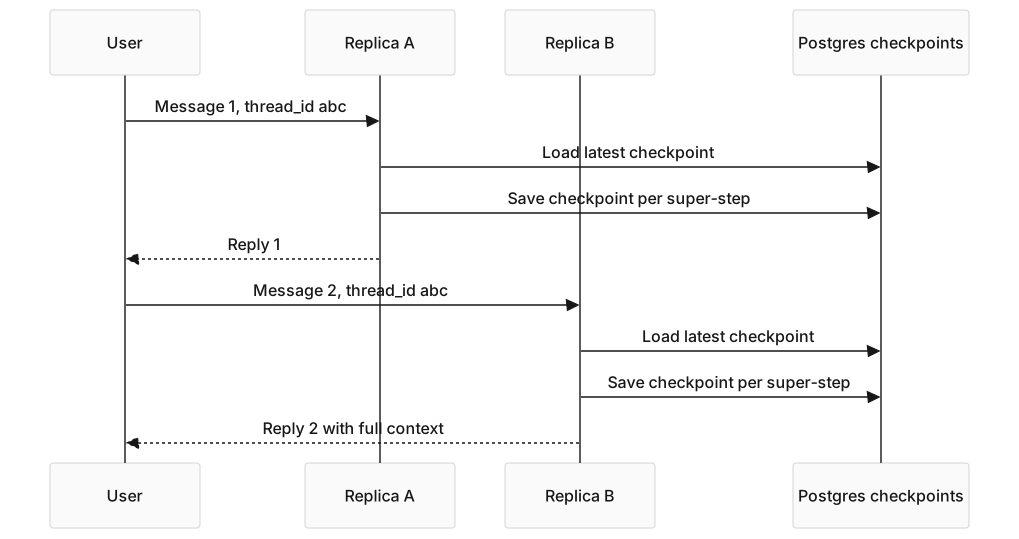
You built a multi-step agent in LangGraph. It plans, calls tools, refines and replies. On your laptop it remembers context across messages because the in-memory checkpointer is doing its job. You ship it behind two replicas. Then a user’s next message lands on the other replica, and the agent has no idea what they were talking about.
LangGraph persistence is a state layer that saves graph state per thread, by writing a checkpoint to a checkpointer backend at every super-step. Pick a shared backend such as Postgres and any replica can resume any conversation. This guide covers what a thread is, how checkpoints work, the Postgres wiring, a thread table for your app, a lock for concurrent messages, and pruning.
Key takeaways
- A LangGraph thread is one conversation, identified by the
thread_idyou pass inconfig["configurable"]. Every checkpoint is scoped to a thread. InMemorySaver(also exported asMemorySaver) keeps checkpoints in process memory, so a restart or a second replica loses them. Use a database checkpointer in production.- A graph compiled with a checkpointer raises a
ValueErrorwhen you invoke it without athread_id. It does not create a fresh thread for you. AsyncPostgresSaver.from_conn_stringopens one connection per worker. For concurrent traffic, pass anAsyncConnectionPoolwithautocommit=Trueandrow_factory=dict_row.- The checkpointer stores state, not product metadata. Keep your own threads table and use its ID as the LangGraph
thread_id.
Why does the in-memory checkpointer fail in production?
Because it lives in one process. The LangGraph docs say MemorySaver and InMemorySaver store checkpoints in RAM, and all checkpoints are lost when the process restarts.
Three failure modes appear as soon as you run more than one process:
- Two replicas behind a load balancer. State on one replica is invisible to the other. The agent forgets the user whenever a request switches replica.
- A redeploy. Containers restart, memory is wiped, and every open conversation is gone.
- A crash. Same as a redeploy, with no warning.
The fix is to move state into a shared database that survives restarts and is visible to every replica. LangGraph ships checkpointers for SQLite (langgraph-checkpoint-sqlite, for local development), Postgres (langgraph-checkpoint-postgres) and MongoDB (langgraph-checkpoint-mongodb). Redis maintains langgraph-checkpoint-redis separately.
What is a thread in LangGraph?
A thread is a single conversation. It has an ID, the thread_id, and a history of checkpoints, one per step the graph took. You select it through the config on every call:
config = {'configurable': {'thread_id': 'abc-123'}}
await graph.ainvoke({'messages': [('user', 'hi')]}, config=config)
The thread is the unit of persistence. LangGraph saves under that key and loads from it on the next call. If you compile with a checkpointer and leave out the thread_id, the call fails with Checkpointer requires one or more of the following 'configurable' keys: thread_id, checkpoint_ns, checkpoint_id.
A thread maps one-to-one to what your frontend calls a chat or conversation. Most apps create a UUID per conversation, store it, and pass it on every call. The persistence docs ask you to keep thread_id values under 255 characters with the Postgres saver.
How does LangGraph persistence work?
LangGraph creates a checkpoint at each super-step boundary. A super-step is one round of the graph: every node scheduled for that round runs, then their writes are applied to the state. Writes from individual nodes inside a super-step are also saved, so a finished node does not rerun after a crash.
Two properties follow:
- Resume after a crash. If a worker dies mid-run, the next call on the same thread starts from the last saved checkpoint, not from scratch.
- Time travel.
graph.get_state_history(config)lists every checkpoint for a thread, newest first. You can resume from any of them, which is how LangGraph Studio replays and forks runs.
When the save happens is set by the durability argument on invoke and stream. The default, "async", saves while the next step runs. "sync" saves before the next step starts, which is safest. "exit" saves only when the run ends, which is fastest but loses mid-run progress on a crash.
The checkpointer is not the store. A checkpointer holds the working state of one thread. A store, such as AsyncPostgresStore, holds long-term memory shared across threads, like a user’s preferred name. Many production apps use both, and you configure them separately.
How do you set up the Postgres checkpointer?
Install langgraph-checkpoint-postgres, open a connection pool in your FastAPI lifespan, and pass the saver to compile(). Call setup() on startup to create the tables.
# filename: app/graph.py
# description: A LangGraph agent with checkpoints in Postgres, one pool per worker.
from contextlib import asynccontextmanager

from fastapi import FastAPI
from langgraph.checkpoint.postgres.aio import AsyncPostgresSaver
from langgraph.graph import END, START, MessagesState, StateGraph
from psycopg.rows import dict_row
from psycopg_pool import AsyncConnectionPool

from app.config import get_settings
from app.nodes import act_node, plan_node, should_continue

settings = get_settings()


def build_graph(checkpointer):
    graph = StateGraph(MessagesState)
    graph.add_node('plan', plan_node)
    graph.add_node('act', act_node)
    graph.add_edge(START, 'plan')
    graph.add_conditional_edges('plan', should_continue, {'act': 'act', 'end': END})
    graph.add_edge('act', 'plan')
    return graph.compile(checkpointer=checkpointer)


@asynccontextmanager
async def lifespan(app: FastAPI):
    async with AsyncConnectionPool(
        settings.database_url,
        max_size=10,
        kwargs={'autocommit': True, 'prepare_threshold': 0, 'row_factory': dict_row},
    ) as pool:
        saver = AsyncPostgresSaver(pool)
        await saver.setup()  # creates or migrates the checkpoint tables
        app.state.pool = pool
        app.state.agent = build_graph(saver)
        yield


app = FastAPI(lifespan=lifespan)
Four details decide whether this works:
setup()must run once per database. It createscheckpoints,checkpoint_blobs,checkpoint_writesandcheckpoint_migrations, and runs migrations. It is safe to call on every startup.- The connection settings are required. The package README says manual connections need
autocommit=True, orsetup()may not persist the tables, androw_factory=dict_row, or reads fail with aTypeError. - Use a pool, not
from_conn_string, under load.from_conn_stringopens a single connection, and the saver serializes access to it with a lock. That is fine for scripts and tests. A pool lets one worker serve concurrent threads. - Keep it on
app.state. Each Uvicorn worker builds its own pool in its own lifespan, which is what you want. For the lifespan pattern itself, see FastAPI and Uvicorn in production.
How do you use threads in a FastAPI request?
Pass the thread_id in the config on every call. The ID comes from your own threads table, covered below.
# filename: app/routes/chat.py
# description: Each request resumes its thread from Postgres and saves new checkpoints.
from fastapi import APIRouter, Request
from pydantic import BaseModel

router = APIRouter()


class ChatIn(BaseModel):
    thread_id: str
    message: str


@router.post('/chat')
async def chat(body: ChatIn, request: Request):
    agent = request.app.state.agent
    config = {'configurable': {'thread_id': body.thread_id}}
    result = await agent.ainvoke(
        {'messages': [{'role': 'user', 'content': body.message}]},
        config=config,
    )
    return {'thread_id': body.thread_id, 'reply': result['messages'][-1].content}
There is no separate save call. The checkpointer has written each super-step by the time ainvoke returns. If the next request lands on a different replica, that replica reads the same checkpoints and continues. For a full chat API around this graph, see a production chatbot API with FastAPI and LangGraph.
What happens when two messages hit the same thread at once?
Both runs read the same latest checkpoint and both write new ones, so one run’s work can be lost or interleaved. Users cause this by sending a second message before the first reply arrives. The LangGraph docs call it double texting.
The LangSmith Agent Server handles it with multitask strategies: reject, enqueue (the default), interrupt and rollback. The docs state those strategies are not available in the open source framework. If you self-host LangGraph inside FastAPI, you add the guard yourself.
A Postgres advisory lock per thread is the smallest guard. This version mirrors the reject strategy:
# filename: app/routes/thread_lock.py
# description: Reject a second run on a thread while the first is still running.
from contextlib import asynccontextmanager

from fastapi import HTTPException


@asynccontextmanager
async def thread_lock(pool, thread_id: str):
    async with pool.connection() as conn:
        row = await (await conn.execute(
            'SELECT pg_try_advisory_lock(hashtextextended(%s, 0)) AS ok', (thread_id,)
        )).fetchone()
        if not row['ok']:
            raise HTTPException(409, 'This thread is already running. Retry when it finishes.')
        try:
            yield
        finally:
            await conn.execute('SELECT pg_advisory_unlock(hashtextextended(%s, 0))', (thread_id,))
Wrap the ainvoke call in async with thread_lock(request.app.state.pool, body.thread_id):. The lock holds one pool connection for the length of the run, so size the pool for your peak number of active threads. For enqueue instead of reject, use the blocking pg_advisory_lock.
Why do you need a thread model on top of the checkpointer?
Because the checkpointer stores state, not product data. It does not know a thread’s title, owner, creation time or whether the user archived it. A “your conversations” list needs all of that, so keep a threads table in your application database.
| Field | Why it exists |
|---|---|
id (UUID, PK) |
Used as the LangGraph thread_id |
user_id (FK) |
So a user can list only their own threads |
title |
Generated from the first user message for display |
created_at |
Sort order and retention |
last_message_at |
“Recently active” sorting |
archived (bool) |
Soft delete without losing checkpoints |
The checkpoint tables have none of those columns. Reading user-facing data out of serialized checkpoints couples your product to LangGraph’s internal format. Keep metadata in your table and let LangGraph own its tables.
The contract between the two: creating a chat inserts a row into threads, and its UUID becomes the thread_id. Check that the row belongs to the caller before every run, so one user cannot pass another user’s ID. Deleting a chat deletes the row and calls await saver.adelete_thread(thread_id), which removes the thread’s checkpoints, blobs and writes.

How do you stop the checkpoint tables from growing forever?
Prune on a schedule. Every super-step of every run adds a checkpoint, and nothing deletes them by default. The Postgres saver has two tools for this:
await saver.aprune(thread_ids, strategy='keep_latest')keeps the latest checkpoint of each thread and deletes the history. The conversation still resumes, but time travel to older steps is gone.await saver.adelete_thread(thread_id)removes a thread completely, for deleted chats or threads past your retention window.
A nightly job that picks thread IDs from your threads table by last_message_at or archived covers most apps. Treat it like log rotation: set the retention window once and let the job run.
What to do next
- Search your code for every
invoke,ainvokeandstreamcall and confirm each one passes athread_id. - Replace
InMemorySaverwithAsyncPostgresSaveron anAsyncConnectionPoolin your FastAPI lifespan, and callsetup()on startup. - Create a
threadstable, use its UUID as thethread_id, and check ownership before each run. - Add a per-thread lock so a second message cannot run on a thread that is still running.
- Kill a container mid-conversation, send the next message to another replica, and confirm the agent continues.
- Schedule a pruning job, then deploy the whole stack in the deploy agentic AI systems lab.
Frequently asked questions
What is a thread in LangGraph?
A thread is a single conversation, identified by the thread_id you pass in config["configurable"]. LangGraph scopes every checkpoint to a thread, so two threads never share state. Most production apps create a UUID per conversation in their own database and pass it on every call. A graph with a checkpointer raises an error if the ID is missing.
What is the difference between MemorySaver and AsyncPostgresSaver?
MemorySaver, now also named InMemorySaver, keeps checkpoints in a dictionary inside the worker process. It needs no setup and loses everything on restart or across replicas. AsyncPostgresSaver keeps checkpoints in Postgres, survives restarts and is shared by every worker on the same database. Use the in-memory saver for tests and notebooks, and Postgres for anything you ship.
Can I use Redis or MongoDB for LangGraph persistence?
Yes. LangGraph lists langgraph-checkpoint-mongodb among its checkpointer packages, and Redis maintains langgraph-checkpoint-redis. Both implement the same checkpointer interface, so the graph code does not change. Pick the database your team already runs and backs up. Postgres is the most common choice because the app database is often Postgres already.
Do I need a separate threads table if LangGraph already stores state?
Yes. The checkpoint tables hold serialized graph state, not user-facing data such as title, owner or archived status. Keep your own threads table and use its primary key as the thread_id. Your table answers product questions, LangGraph’s tables answer “where did this run stop?”, and the two share only the ID.
How do I delete old LangGraph checkpoints?
Use the Postgres saver’s own methods rather than raw SQL. adelete_thread removes every checkpoint, blob and write for one thread. aprune with strategy='keep_latest' keeps only the latest checkpoint per thread, which keeps the conversation and drops the step history. Run either from a scheduled job driven by your threads table.
Sources
- Persistence, LangChain docs, October 2026: checkpointers versus stores, in-memory savers losing state on restart, and the
thread_idlength limit. - Checkpointers, LangChain docs, October 2026: super-step checkpoints, durability modes,
get_state_historyand the checkpointer packages. - langgraph-checkpoint-postgres README, LangChain on GitHub, October 2026:
setup(), and theautocommitanddict_rowrequirements. - Double texting, LangChain docs, October 2026: the multitask strategies and that they are not in the open source framework.